

 Trending
  VISIT THIS SITE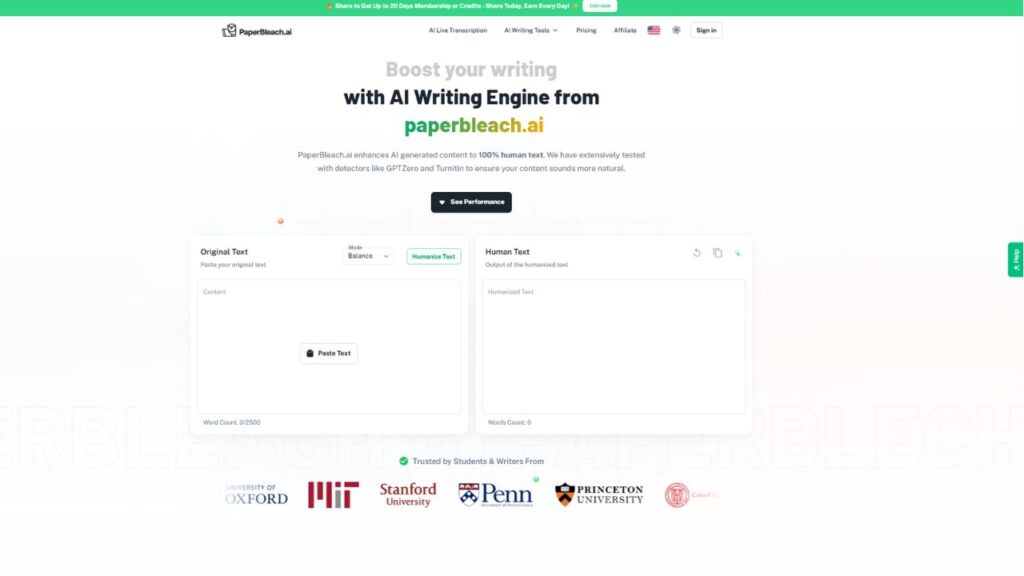
 ChatGPT
 Perplexity
 Claude AI

 Official Website
  Affiliate Program Link
 PaperBleach AI : Honest Look at Pricing, Features & Whether It Actually Works
You paste in a paragraph from ChatGPT, hit a button, and hope the words come out sounding like you wrote them instead of a model. That’s the entire pitch behind PaperBleach AI, and if you’ve spent any time on Reddit threads about AI detectors, you’ve probably seen the name pop up. This review breaks down what PaperBleach actually does, what it costs, and where it holds up (or doesn’t) based on independent testing from multiple reviewers who’ve put it through its paces.
Quick Facts
- Category: AI Humanizer & AI Detection Checker
- Best For: Students, bloggers, and marketers cleaning up short-to-medium AI drafts
- Free Plan: Limited one-time trial (roughly 2,500 words), not ongoing free use
- Starting Price: Subscription-based, with monthly and yearly tiers
- Platforms: Web-based only
- gyanshout.com Rating: 3.2/5
What Is PaperBleach AI? (And Who Actually Needs It)
PaperBleach AI is a web-based AI humanizer paired with a built-in AI detection checker. The pitch is right there in the name — it’s meant to “bleach” the telltale patterns that detectors like Turnitin, GPTZero, and Originality.ai look for in machine-generated text.
Who’s this actually for? Mostly students trying to avoid a plagiarism flag on an essay, freelance writers polishing AI-assisted drafts before sending them to a client, and content marketers who use ChatGPT for first drafts but need the final copy to read like a person wrote it. If you’ve ever gotten a piece of AI writing back and thought “this sounds like a robot trying to sound casual,” you already understand the itch PaperBleach is trying to scratch.
The workflow is about as simple as it gets. You paste your text, pick a rewrite mode, and the tool spits out a version designed to dodge AI detectors while (ideally) keeping your meaning intact. There’s no learning curve here — that’s both the appeal and, as you’ll see below, part of the limitation.
Have you ever run a piece of AI-assisted writing through a detector and been surprised by the score? That gap between what you expect and what the checker says is exactly the problem this category of tool exists to solve.
Key Features of PaperBleach AI — What Makes It Stand Out
Multiple Humanization Modes
PaperBleach gives you a few rewrite intensity settings — reviewers describe them variously as Quality/Balance/Extreme or Standard/Aggressive/Academic, depending on which version of the interface they tested. The idea is straightforward: a lighter setting keeps more of your original phrasing intact, while a heavier setting rewrites more aggressively to chase a lower detection score. In practice, the heavier settings are where things get risky — more on that in the pros and cons section.
Built-In AI Detector (Separate Step)
Unlike some competitors that bundle detection and rewriting into one screen, PaperBleach keeps its detector as a distinct tool. You run your text through the humanizer, then copy the output over to the detector page to check the score. It works, but it’s an extra click that feels clunky compared to tools with an integrated single-screen workflow.
Fast, No-Frills Processing
Whatever else you think of PaperBleach, it’s quick. There’s minimal configuration — paste, choose a mode, click, and you have output in seconds. For anyone who just wants a fast pass at a short document without messing with settings, that speed matters.
Academic-Leaning Presets
One of the rewrite modes is aimed specifically at preserving a formal, academic tone while still altering sentence structure. This is clearly built with students in mind, though as you’ll see in the testing section, “academic mode” doesn’t guarantee academic-safe results.
Clean, Minimal Interface
The tool doesn’t bury you in settings or dashboards. This lowers the barrier to entry for casual users, though power users who want granular control — locking specific keywords, adjusting reading level, paragraph-by-paragraph rewriting — will likely find it thin on options compared to more feature-dense alternatives.
Login-Gated Trial
You need to create an account before you can properly test the tool, which is a bit more friction than a true no-signup free tool. It’s not a dealbreaker, but it does mean you’re handing over an email address before you know if the output quality is worth your time.
PaperBleach AI Pricing Plans — What You Actually Get for Your Money
PaperBleach runs on a subscription model, and multiple reviewers who tested it in 2026 describe the same basic structure: a one-time free trial capped around 2,500 words, followed by paid access. Beyond the trial, the plans reportedly include a weekly pass for short-term testing, plus monthly and yearly subscriptions.
Here’s the part worth flagging: the gap between the monthly and yearly price is unusually steep — one review pegged the difference at roughly $10.99, which is a strong nudge toward locking in for a full year before you’ve had much chance to judge output quality over time. Both the monthly and yearly tiers appear to carry the same usage allowance — around 200 rewrites per month, capped at 2,500 words per request.
If you’re the type who wants to test-drive a tool for a few weeks before committing annually, that pricing structure is worth noting. A weekly pass exists, but the real value tier only shows up once you’re paying for months at a time.
How Does PaperBleach AI Compare to Alternatives?
| Tool | Best For | Starting Price | Free Plan | Overall Rating |
|---|---|---|---|---|
| PaperBleach AI | Short drafts, casual rewriting | Subscription (monthly/yearly) | One-time trial only | 3.2/5 |
| Tenorshare AI Bypass | Multilingual rewriting, broader tone control | Subscription | Limited free features | 3.6/5 |
| AI Natural Write | Long-form content, transparent pricing | Subscription | More generous free tier | 3.7/5 |
| RewriteAI | Academic-safe rewriting across multiple detectors | Subscription | Free plan with monthly renewal | 3.8/5 |
Take these ratings with a grain of salt — several of the sources comparing themselves to PaperBleach are, unsurprisingly, the competitors named in the table. That said, the pattern across independent write-ups is consistent enough to trust directionally: PaperBleach performs fine for quick, low-stakes rewriting, but tools built around ongoing free access and stronger long-form handling tend to score better in side-by-side tests.
Real-World Use Cases — Who Gets the Most Value?
The casual blogger polishing a quick post. Say you drafted a 400-word blog intro with ChatGPT and just want it to sound a little less stiff before publishing. PaperBleach’s speed and simplicity fit this use case well — you’re not looking for perfection, just a quick pass.
The social media manager writing captions. Short-form content where a slightly loose or “texting style” tone reads as authentic rather than sloppy is exactly the kind of low-stakes writing where PaperBleach’s quirks are less likely to matter.
The student under deadline pressure. This is where things get risky. If you’re submitting an essay through Turnitin, testers have found PaperBleach’s rewrites simply don’t hold up against that detector, and the grammar issues introduced by aggressive rewriting can be more noticeable to a human grader than any AI flag would have been in the first place.
The freelancer sending client work. If you’re emailing a client a proposal or report, introduced typos or awkward phrasing can cost you more credibility than an AI detection score ever would. This is a case where the tool’s speed works against you — you still need to proofread every line it touches.
The SEO content team publishing at scale. For teams pushing out dozens of articles a month, the 2,500-word cap per request and 200-rewrite monthly ceiling could turn into a bottleneck fairly quickly, especially for longer articles that need multiple passes.
Have you tried using an AI humanizer as part of your publishing workflow? What did you notice about the quality trade-off between speed and accuracy? Drop a comment — it’s one of those things that seems to vary a lot depending on content type.
Paperbleach Ai FAQ
Q : Is PaperBleach AI free?
Ans : Not really. You get one free trial capped around 2,500 words after signing up, but ongoing use requires a paid plan. There’s no recurring free tier that renews monthly.
Q : Is PaperBleach AI safe to use?
Ans : It doesn’t appear to raise obvious privacy red flags, and most reviewers don’t report data misuse. That said, always read a tool’s privacy policy before pasting sensitive or unpublished work into any third-party rewriter.
Q : What is PaperBleach AI best for?
Ans : Short, low-stakes rewriting — blog intros, social captions, casual emails. It’s less reliable for long-form academic or professional writing where grammar precision and detector accuracy really matter.
Q : Does PaperBleach AI actually bypass Turnitin?
Ans : Based on independent testing reported by multiple reviewers, PaperBleach struggles against Turnitin and Originality.ai specifically, even though it can beat weaker checkers like ZeroGPT. If academic detection is your main concern, this is the single biggest thing to know before paying.
Q : PaperBleach vs Tenorshare AI Bypass — which is better?
Ans : Tenorshare’s tool reportedly offers broader language support and more tone customization. If you write in multiple languages or need fine control over voice, that’s likely the stronger fit. PaperBleach wins on simplicity if you just want a fast, no-fuss rewrite.
Q : Does PaperBleach’s humanizer hurt readability?
Ans : On shorter pieces, testers found the output stayed fairly smooth. On longer pieces, several reviewers noted awkward sentence structures and occasional loss of technical accuracy, especially on the more aggressive rewrite setting.
Q : Is there a PaperBleach AI detector I can use separately from the humanizer?
Ans : Yes — the detector functions as its own page rather than being integrated into the rewrite results. It works as a basic check, but you’ll want to combine it with more established detectors if you need a high-confidence read on a document.
My Honest Verdict — Should You Use PaperBleach AI?
PaperBleach AI does one thing reasonably well: fast, no-frills rewriting for short, casual content. If that’s your use case — quick blog edits, social captions, informal drafts — it’s a defensible pick, and the interface won’t waste your time.
Where it falls short is anywhere the stakes are higher. Academic submissions, client-facing documents, and long-form professional writing are exactly where you can’t afford introduced grammar errors or a failed pass against Turnitin, and that’s precisely where independent testing shows PaperBleach struggling the most.
Score: 3.2/5. Worth trying for quick, low-stakes rewriting if you’re already curious. Skip it — or at least budget serious time for manual editing — if you’re relying on it for anything where accuracy and detector reliability actually matter. See if it fits your workflow before committing to the annual plan.