

 Trending
  VISIT THIS SITE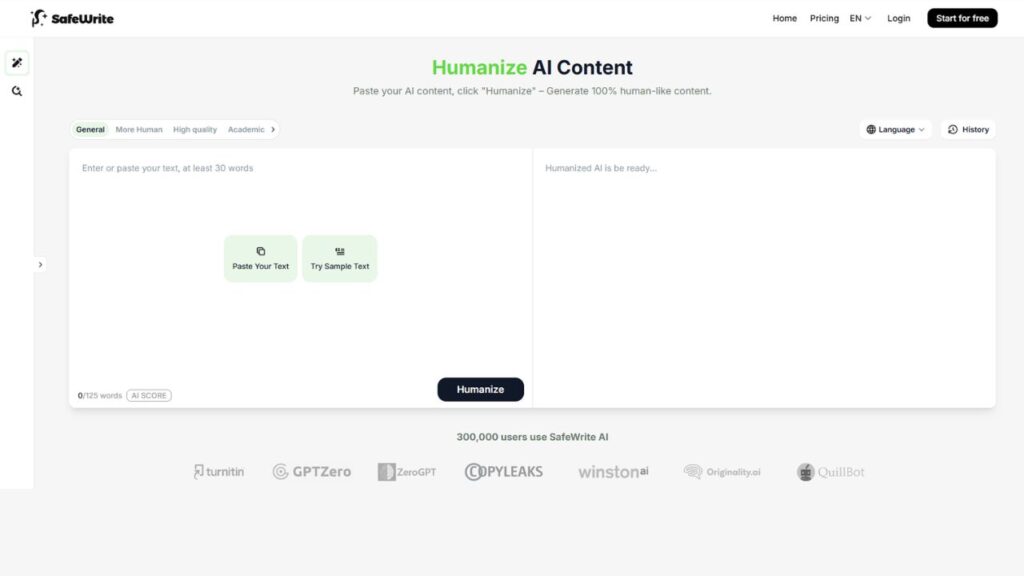
 ChatGPT
 Perplexity
 Claude AI

 Official Website
  Affiliate Program Link
 SafeWrite AI : Honest Look at the Personalized AI Humanizer That Fights Back Against Detectors
If you’ve ever spent an hour crafting AI-assisted content, only to watch it get flagged by Turnitin or GPTZero in seconds — you already know how frustrating this cat-and-mouse game has become. Detectors are getting sharper. Rewriters are racing to keep up. And somewhere in the middle, writers like you are stuck wondering which tool actually delivers on its promises.
SafeWrite AI steps into that space with a specific promise: it won’t just rewrite your text — it’ll learn how you write and produce content that sounds like it came from your brain, not a language model. That’s a bold claim. This review breaks it all down — features, pricing, real-world use cases, and where it falls short.
Safewrite Ai Overview
| Detail | Info |
|---|---|
| Developer / Company | SafeWrite AI |
| Founded | 2021 |
| Category | AI Humanizer / AI Content Detector |
| Free Plan | Yes (Limited Trial Credits) |
| Starting Price | $9.99/month |
| Best For | Students, Freelancers, Content Creators, Marketers |
| Platforms | Web (Browser-Based) |
| gyanshout.com Rating | 4.2 / 5 |
What Is SafeWrite AI? (And Who Actually Needs It)
SafeWrite AI is an all-in-one AI humanizer and AI content detector built for anyone who uses AI-generated text and needs it to pass through detection systems unnoticed. The platform does two things simultaneously that most competitors split into separate products: it rewrites AI content to sound genuinely human, and it lets you verify that output against multiple major detectors — all in one dashboard.
The core mechanic is what makes SafeWrite stand out. Instead of running your text through a generic rewriting engine shared by thousands of users, SafeWrite builds a private rewriting model based on your personal writing patterns. Feed it your previous essays, blog posts, or writing samples, and over time it starts producing rewrites that carry your voice — your sentence rhythm, your vocabulary choices, your paragraph structure.
Who needs this? Honestly, quite a few people. Students using AI to draft assignments who need the final output to sound like them. Freelance writers who use ChatGPT or Claude for first drafts but can’t hand in something that screams “generated by a robot.” Marketing teams producing high-volume content under tight deadlines. Professionals writing reports and proposals who want AI-assisted efficiency without the reputational risk of detection.
If you’ve tried a generic text spinner and been disappointed, SafeWrite AI is worth a closer look. The personalization angle is where it separates itself from the pack.
Key Features of SafeWrite AI — What Makes It Stand Out
Personalized AI Humanizer
This is SafeWrite’s headline feature and the one that actually justifies the subscription. Most AI humanizer tools run your content through a shared model. The problem? Detectors learn those shared patterns. SafeWrite builds a private model tied to your specific writing habits — sentence length, transition phrasing, paragraph flow, vocabulary tendencies.
The more you use it and the more writing samples you feed it, the better the output becomes. For students or regular content creators who produce consistent volumes of writing, this compounds over time into genuinely impressive results.
All-in-One AI Detection Suite
Manually checking content across Turnitin, GPTZero, ZeroGPT, Copyleaks, and Content at Scale is expensive and slow. SafeWrite bundles all of them into a single interface. One click, one comprehensive report showing AI probability scores side-by-side from every major detection tool.
This alone saves you real money. Individual subscriptions to those detectors can add up fast. Getting them all in one dashboard for the cost of a SafeWrite plan is solid value.
Long-Form Content Support (Up to 3,000 Words)
On the Ultra plan, SafeWrite handles up to 3,000 words per rewrite request. For academic writers working on thesis chapters or content marketers producing full-length blog posts, that’s a meaningful limit. Lower plans cap at 750 or 1,500 words per request, which is still workable for most everyday tasks.
Multi-Language Support
SafeWrite isn’t limited to English. The platform supports multiple major languages, making it useful for international students, multilingual content teams, and researchers writing in non-English academic environments. Specific supported languages aren’t exhaustively listed on their site, but the feature exists and works for widely-used languages beyond English.
Privacy-First Architecture
SafeWrite states clearly that it does not store or share user data or rewriting patterns. For academic users in particular, this matters — submitting thesis content to a third-party tool that might retain it creates real risk. The privacy commitment addresses that concern directly, though users in regulated environments should still request documentation on their data-handling policies before relying on it.
Detection Credit System
Each plan comes with monthly detection credits (50 on Standard, 100 on Pro, 200 on Ultra). These credits cover running your content through the integrated detection suite. Unlimited rewrite words on the Ultra plan means you’re only capped on detection runs, not on humanization itself — a smart structure for power users.
Free Trial With Limited Credits
New users get a free trial with limited credits to test both the humanizer and the detection features before committing to a paid plan. No credit card required for the trial. This is the right approach for a tool asking you to trust it with sensitive academic or professional content — try it before you pay.
Have you used the free trial yet? What was your first impression of the rewrite quality? Drop a comment below.
SafeWrite AI Pricing Plans — What You Actually Get for Your Money
SafeWrite offers three paid plans plus a free trial. Here’s the breakdown as of Q3 2026 (always verify current pricing on the official SafeWrite pricing page):
Standard — $9.99/month
- 20,000 words/month total
- Humanize up to 750 words per request
- 50 detection credits/month
- Access to basic AI detectors
- All languages included
This plan works for occasional users — a student writing a few papers per month, or a blogger producing one or two posts weekly. The 750-word per-request limit means you’ll need to split longer content into chunks.
Pro — $14.99/month
- 60,000 words/month
- Humanize up to 1,500 words per request
- 100 detection credits/month
- Includes Originality.ai detection
- All languages included
The Pro plan is the sweet spot for freelancers and content creators producing regular output. The jump from 50 to 100 detection credits is meaningful, and Originality.ai integration adds a detector that’s increasingly used by clients and publishers to vet content.
Ultra — $29.99/month
- Unlimited rewrite words
- Humanize up to 3,000 words per request
- 200 detection credits/month
- Access to 5 rewrite models plus a new model
- All languages
- Full detection suite including popular detectors
For agencies, power users, or anyone producing high-volume content daily, Ultra is the only plan that removes the word ceiling entirely. The 5 rewrite models give you variation in output style, which matters if you’re producing content across multiple clients or contexts.
The pricing is competitive. Undetectable AI starts at the same $9.99, and StealthGPT jumps to $17.99 without a proper free trial. For the feature set — especially the multi-detector integration — SafeWrite’s pricing holds up well.
How Does SafeWrite AI Compare to Alternatives?
| Tool | Best For | Starting Price | Free Plan | Overall Rating |
|---|---|---|---|---|
| SafeWrite AI | Personalized humanizing + multi-detector suite | $9.99/month | Yes (limited credits) | 4.2/5 |
| Undetectable AI | General humanizing + single detector | $9.99/month | Yes (250 words) | 4.0/5 |
| StealthGPT | High-volume stealth rewriting | $17.99/month | No (once per 7 days) | 3.8/5 |
| Phrasly | Student-focused AI bypass | ~$9.99/month | Yes (limited) | 3.7/5 |
The main differentiator is the personalized model. Undetectable AI uses a shared model with some customization options. StealthGPT uses multiple shared “stealth engines.” SafeWrite’s private, user-specific model is a genuine architectural difference — not just a marketing claim.
The all-in-one detector suite is also a meaningful advantage. Undetectable AI integrates a single proprietary detector. SafeWrite runs your content through Turnitin, GPTZero, ZeroGPT, Copyleaks, Content at Scale, and Originality.ai (on Pro+) in one shot. For users who need verification across multiple platforms, that consolidation matters.
Real-World Use Cases — Who Gets the Most Value?
Students Writing Academic Papers
A graduate student using Claude or ChatGPT to draft the structure and rough arguments of a thesis chapter can run that draft through SafeWrite before submission. The personalized model learns from their previous writing samples — preserving their academic voice, citation habits, and sentence complexity — while restructuring the AI-generated portions to pass Turnitin detection. The integrated Turnitin check lets them verify before submitting, not after.
Freelance Content Writers
A freelancer managing five blog clients simultaneously might use AI to produce first drafts at speed, then run each piece through SafeWrite to ensure the output matches the client’s brand voice and passes any AI detection tools the client uses to vet content. The Pro plan’s 60,000 monthly words and 100 detection credits cover a solid content workload without breaking the budget.
Marketing Teams Producing Campaign Copy
A small marketing team producing email sequences, social ad copy, and landing page text can use SafeWrite to ensure AI-assisted copy sounds personal and brand-consistent rather than generic. The multi-detector check is useful before submitting content to platforms or clients that screen for AI-generated text.
Journalists and Bloggers
A journalist using AI to research and draft opinion pieces needs the final output to carry their established voice — their rhythm, their word choices, their structural preferences. SafeWrite’s personalized model, trained on previous published pieces, can handle the transformation from generic AI draft to authentic-sounding prose. The tool won’t replace genuine journalism, but it can speed up the production side without compromising the voice.
Non-Native English Writers
A researcher writing in English as a second language might produce clear but stilted AI-assisted drafts. SafeWrite can help bridge that gap — restructuring the AI output toward more natural English phrasing while preserving the original argument and meaning. The multi-language support also helps users working in non-English academic environments.
Which of these use cases fits your workflow? Have you found a creative way to use an AI humanizer that wasn’t in this list? Drop it in the comments.
My Honest Verdict — Should You Use SafeWrite AI?
SafeWrite AI earns a 4.2/5 from gyanshout.com.
The personalized rewriting model is the real thing. It’s not just a marketing angle — it’s an architectural choice that produces noticeably better results for consistent users than shared-model alternatives. The all-in-one detection suite is genuinely useful and saves meaningful money for anyone who currently subscribes to detectors separately.
The weak spots are real too. The tool takes time to get good — early output without a trained personalized model is decent but not dramatically different from competitors. Detection credit limits on lower plans can create friction for heavy users. And the lack of formal compliance documentation means enterprise buyers should dig deeper before deploying it across a team.
Who should use SafeWrite AI:
- Students producing regular AI-assisted academic writing who need reliable detection bypass
- Freelancers and content creators needing an affordable all-in-one humanizer and detection tool
- Marketing teams producing high-volume AI-assisted copy under client scrutiny
Who should skip it:
- Occasional users who write rarely — the personalized model won’t develop enough to justify the subscription over a free alternative
- Enterprise buyers needing SOC 2 compliance and formal security documentation before onboarding
- Writers who need a desktop app or browser extension rather than a web-only tool
The free trial is your best first move. Try it with a real piece of your writing — ideally something you’ve already written in your own voice — and see how well the humanizer matches your style out of the gate. That will tell you more than any review can.
Try the free trial at safewrite.ai and run a few tests before committing to a plan.
SafeWrite AI FAQ
Q : Is SafeWrite AI free?
Ans : SafeWrite AI offers a free trial with limited credits that covers both the AI humanizer and the detection features. No credit card is required to start. For ongoing use, paid plans start at $9.99/month.
Q : Is SafeWrite AI safe to use?
Ans : SafeWrite states that it does not store or share user data or rewriting patterns. This privacy-first design is particularly relevant for students and professionals submitting sensitive content. That said, users in regulated or enterprise environments should request formal documentation on data handling before relying on the platform.
Q : What is SafeWrite AI best for?
Ans : SafeWrite AI is best suited for students, freelancers, and content creators who produce regular volumes of AI-assisted writing and need it to pass AI detection tools like Turnitin, GPTZero, and Copyleaks. Its personalized humanizer and all-in-one detection suite are the two strongest features.
Q : SafeWrite AI vs Undetectable AI — which is better?
Ans : Both start at $9.99/month and offer a free trial. SafeWrite’s private personalized model gives it an edge for consistent users over time, and its multi-detector suite is broader than Undetectable AI’s single proprietary detector. Undetectable AI has a larger established user base and more third-party reviews. For new users, the choice comes down to whether personalization or familiarity matters more.
Q : Does SafeWrite AI work for Turnitin?
Ans : SafeWrite AI integrates Turnitin directly into its detection suite, and its humanizer is specifically designed to produce output that passes Turnitin’s AI detection checks. Results vary based on the quality of the input and how well the personalized model has been trained on your writing samples.
Q : Can SafeWrite AI handle long documents?
Ans : Yes, on the Ultra plan ($29.99/month), SafeWrite handles up to 3,000 words per rewrite request with unlimited total monthly words. The Standard plan caps at 750 words per request, which may require splitting longer documents manually.
Q : What languages does SafeWrite AI support?
Ans : SafeWrite AI supports multiple major languages beyond English, making it useful for international academic writers and multilingual content teams. Specific supported languages are not exhaustively listed on the official site — contact support for confirmation on your target language before subscribing.