

 Trending
  VISIT THIS SITE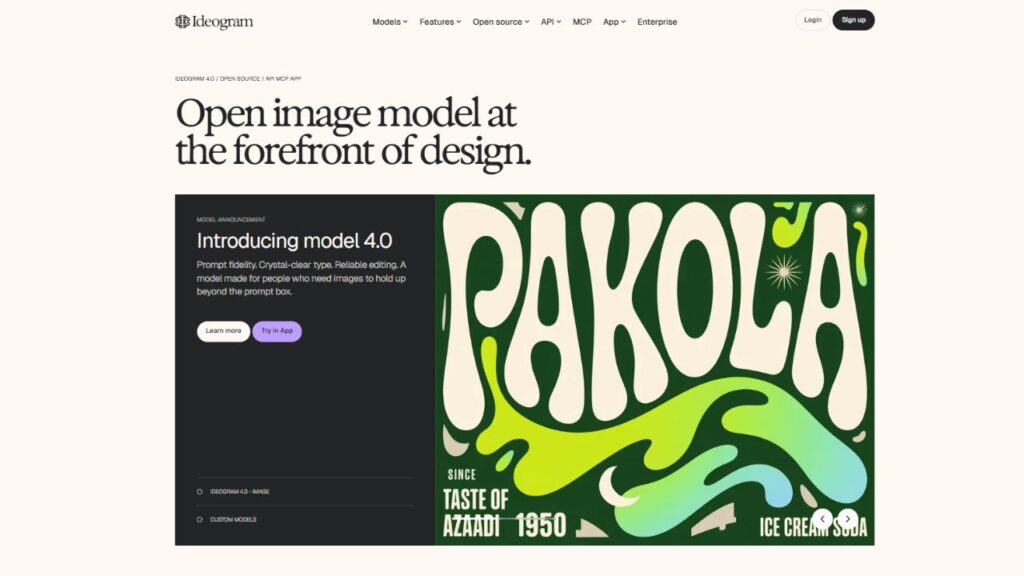
 ChatGPT
 Perplexity
 Claude AI

 Official Website
  Affiliate Program Link
 Ideogram AI Review: Is This the Best AI Image Generator for Text & Design?
Every designer has felt that frustration. You spend 20 minutes crafting the perfect AI image prompt — the composition is stunning, the lighting is chef’s kiss — and then you zoom in on the text. It says “Cofffe Shpo” in some alien alphabet. Again.
That’s the exact problem Ideogram AI was built to fix. And after spending considerable time with the platform, it’s clear this tool earns its spot in any serious creator’s toolkit — but not without some caveats worth knowing upfront.
Quick Facts
| Detail | Info |
|---|---|
| Developer | Ideogram, Inc. |
| Founded | 2023 |
| Category | AI Image Generator |
| Free Plan | Yes (10 prompts/day) |
| Starting Price | $7/month (Basic) |
| Best For | Designers, marketers, social media creators, logo work |
| Platforms | Web (ideogram.ai), iOS |
| gyanshout.com Rating | 4.3/5 |
What Is Ideogram AI? (And Who Actually Needs It)
Ideogram AI is an AI-powered image generator with one standout specialty: it can actually put readable text inside images. Not garbled nonsense. Not backwards letters. Real, accurate, correctly spelled words — embedded in your visuals right where you asked for them.
Founded in 2023 by former Google Brain researchers, Ideogram secured $16.5 million in seed funding before its third major iteration, Ideogram 3.0, dropped in 2025. The team built the platform specifically to address what every other AI image tool gets embarrassingly wrong.
If you’ve ever needed a poster with a quote, a social media graphic with a tagline, a product mockup with a brand name, or a logo exploration — you already know why text-in-image accuracy matters. For that crowd, Ideogram isn’t just useful. It might be the only tool that actually does the job.
That said, if you’re chasing cinematic, gallery-worthy artwork, this isn’t where you’d start. Midjourney still owns that lane. Ideogram is for people doing real design work, not fine art.
Key Features of Ideogram AI — What Makes It Stand Out
Text Rendering Inside Images
This is the headliner. Text-to-image generation with accurate typography is Ideogram’s defining capability. In independent testing, Ideogram achieves around 95% accuracy on text prompts, compared to roughly 40% for Midjourney. For anything involving posters, banners, event flyers, product labels, or thumbnail text — that gap is enormous.
When you type “coffee shop sign that reads ‘Daily Grind'” you actually get a sign that reads “Daily Grind.” It sounds obvious. Every other tool proves it isn’t.
Magic Prompt
Not great at writing detailed AI prompts? Magic Prompt is Ideogram’s AI-powered prompt enhancer. You type a rough idea — “minimalist yoga poster” — and the tool expands it into a well-structured prompt that produces significantly better results. It’s especially useful if you’re new to AI generation and still learning how to talk to these models.
This feature alone cuts the learning curve substantially for non-designers trying to produce professional-looking visuals.
Style Reference and Style Codes
Style Reference lets you upload up to three images and tell Ideogram to match their visual style. If you’ve been building a brand identity or maintaining a consistent aesthetic across social posts, this feature is genuinely useful. Ideogram also generates Style Codes — shareable codes that lock in a specific look so you can reproduce it across future generations without re-uploading references every time.
For agencies running multiple client campaigns, this is a real workflow improvement.
Canvas Editor (Inpainting & Outpainting)
The Canvas Editor lets you edit specific parts of a generated image (inpainting) or extend it beyond its original borders (outpainting). If a logo generation is perfect except for one corner, you can fix just that area rather than regenerating from scratch. This reduces wasted credits and speeds up iteration significantly.
The tool also handles background removal and replacement — useful for product photography mockups without needing a separate editing tool.
Batch Generation
Pro and Team plan users can upload a CSV with up to 500 prompts and generate them all in one run. For social media managers producing weekly content calendars, or marketers who need dozens of ad creative variations, this is a serious time-saver. Most individual users won’t touch this feature — but if you know you need it, it’s a strong reason to consider the Pro tier.
Aspect Ratio Control
Ideogram supports aspect ratios between 1:3 and 3:1, covering everything from portrait stories to landscape banners. You can select from presets for Instagram, YouTube, Pinterest, and more. This sounds minor until you’ve spent time cropping AI images to fit a format they weren’t generated for.
API Access
Developers can access Ideogram’s API directly at developer.ideogram.ai, separate from the subscription plans. API pricing runs from $0.03 to $0.09 per image depending on quality tier. You don’t need a subscription to use the API — just add a payment method, and the system auto-tops up your credit balance when it drops below $10.
Ideogram AI Pricing Plans — What You Actually Get for Your Money
Ideogram’s pricing is prompt-based: each prompt generates 4 images, so your real image count is 4x the prompt number.
Free Plan — $0/month You get 10 prompts per day (roughly 40 images). There’s a catch: free users go into the “slow queue,” which can mean waits of up to 20 minutes per generation. Also, all free-tier generations are public by default. For casual testing, it works. For any real workflow, it’s limiting.
Basic — $7/month (billed annually) 400 prompts per month, faster priority queue, private image generation, no public display. This is the entry point that actually makes Ideogram usable for regular work. At $7/month, it’s one of the more affordable paid AI image plans available.
Plus — $15/month (billed annually) 1,000 prompts per month, plus access to unlimited slow-queue generation (the same 20-minute queue, but without a monthly cap). Good for moderate-volume users and freelancers who create visual content regularly.
Pro — $42/month (billed annually) 3,000 prompts per month, Batch Generation (up to 500 prompts via CSV), priority generation speeds, and the fullest feature set. This tier is built for agencies, prolific content creators, and anyone running high-volume image workflows.
Team Plan — Custom pricing, multi-seat, shared brand assets, and admin controls.
Annual billing saves approximately 40% across all tiers. The Pro plan at $42/month works out to $25/month billed annually — a significant difference over 12 months.
One thing to flag: in early 2025, Ideogram quietly extended slow-queue waits from 2 minutes to up to 20 minutes without announcing the change. Paid users noticed immediately. If “unlimited slow credits” on Plus sounds appealing, understand that 3 images per hour is the practical ceiling under that queue — essentially unusable for batch work.
How Does Ideogram Compare to Alternatives?
| Tool | Best For | Starting Price | Free Plan | Overall Rating |
|---|---|---|---|---|
| Ideogram AI | Text in images, design work, logos | $7/month | Yes (limited) | 4.3/5 |
| Midjourney | Fine art, cinematic aesthetics | $10/month | No | 4.7/5 |
| DALL-E 3 | Prompt accuracy, beginner ease | Via ChatGPT Plus ($20/mo) | Yes (ChatGPT free) | 4.1/5 |
| Adobe Firefly | Commercial-safe, brand work | $4.99/month | Yes (limited) | 4.0/5 |
Ideogram wins on text rendering and price. Midjourney wins on visual artistry. DALL-E 3 wins on prompt understanding and accessibility. Adobe Firefly wins when you need bulletproof commercial licensing clarity.
The honest answer: serious creators often end up using two of these in tandem. Ideogram for design-specific and text-heavy work, Midjourney for art direction and concept visuals.
Which of these tools are you currently using in your workflow? Drop a comment — the combination strategies are worth discussing.
Real-World Use Cases — Who Gets the Most Value?
Social Media Managers If you’re producing 20-30 pieces of visual content per week — quote cards, promotional graphics, story slides — Ideogram’s text accuracy removes a major frustration from the workflow. You can generate a styled quote card in one prompt without opening Canva to fix the text afterward.
Freelance Graphic Designers Logo exploration and poster design are where Ideogram earns its keep. When a client asks for five different logo directions, you can generate rough visual concepts quickly, present options, and then execute the chosen direction in your actual design software. It compresses the concepting phase significantly.
Small Business Owners Running a bakery, yoga studio, or local event and need graphics for Instagram, flyers, or signage? The free or Basic tier gives enough output to handle typical small business content needs without hiring a designer for routine visual work.
Content Creators and YouTubers Thumbnail text is notoriously tricky in AI generators. Ideogram handles it reliably. If your thumbnail strategy involves bold text overlays on a generated background, this tool makes that workflow actually functional.
Developers Building Visual Products The API tier — priced per image at $0.03–$0.09 — makes Ideogram an accessible backend for apps that need AI-generated images with readable text. Greeting card generators, social proof image builders, or marketing asset tools could integrate Ideogram’s API without a heavy subscription commitment.
My Honest Verdict — Should You Use Ideogram AI?
Ideogram AI earns its reputation as the go-to tool for text-in-image generation. Nothing else on the market does it as reliably, and at $7/month to get started, the price-to-value ratio is genuinely strong.
Where it falls short is photorealism, consistency with human subjects, and the somewhat sneaky queue policy changes for paid users. If you need cinematic visuals or gallery-quality art, Midjourney remains the better tool. If your work involves text, design, branding, and marketing graphics — Ideogram should be at the top of your list.
Use it if: You’re a designer, marketer, social media manager, or content creator who regularly needs images with readable text, logo concepts, or branded visual content.
Skip it if: You need high-fidelity photorealistic human portraits, fine art outputs, or offline/desktop access.
Try the free plan at ideogram.ai — 10 prompts per day is enough to test whether it fits your workflow before spending a dollar.
ideogram FAQ
Q : Is Ideogram AI free to use?
Ans : Yes. Ideogram offers a free tier with 10 prompts per day (generating approximately 40 images). Free generations go into a slow queue and are public by default. Paid plans start at $7/month for private, priority generation.
Q : Is Ideogram AI safe to use?
Ans : Yes. Ideogram has content moderation policies that prevent generation of prohibited content. API billing uses Stripe and includes auto-top-up, so it’s worth setting a spending limit if you’re a new API user to avoid unexpected charges.
Q : What is Ideogram AI best for?
Ans : Ideogram is best for generating images that include readable text — posters, social graphics, logos, banners, product labels, and event flyers. It outperforms every other major AI image generator on text accuracy.
Q : Ideogram vs Midjourney — which is better?
Ans : They serve different use cases. Ideogram wins for text accuracy and design-focused work. Midjourney wins for artistic quality, photorealism, and cinematic aesthetics. Many professionals use both.
Q : Does Ideogram have an API?
Ans : Yes. The API is available at developer.ideogram.ai and is priced per image from $0.03 to $0.09, depending on quality tier. No subscription is required for API access.
Q : Can I use Ideogram images commercially?
Ans : Yes, paid plan images can be used commercially. Free-tier images should be reviewed against Ideogram’s current Terms of Service before commercial use, as policies can change. Check ideogram.ai/terms for the most current guidance.