VISIT THIS SITE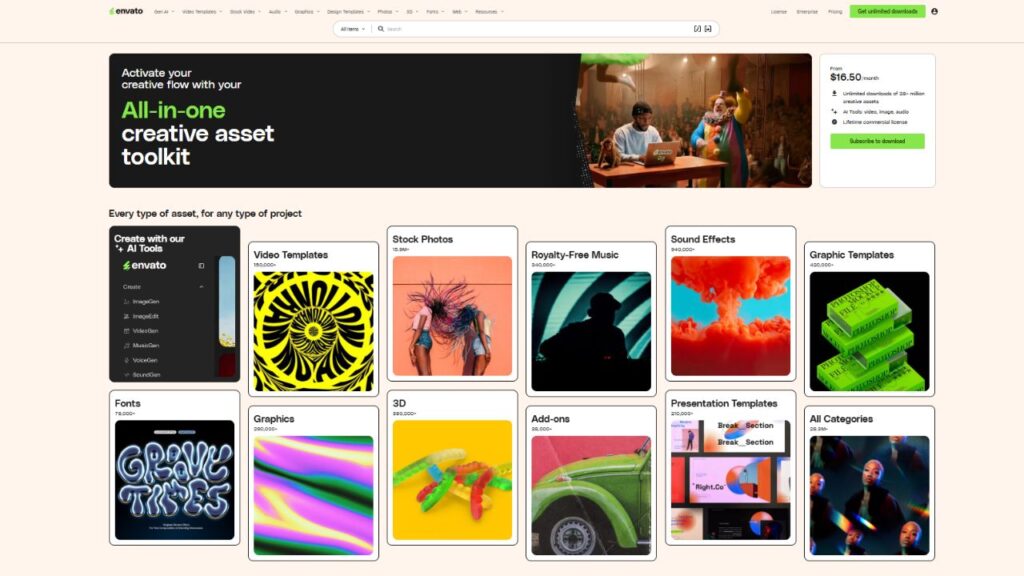
 ChatGPT
 Perplexity
 Claude AI

 Official Website
 Envato Elements – I remember the first time I tried to build a professional brand kit using credit-based stock sites. I spent $50 on three photos and a font, only to realize I needed five more photos to make the landing page look coherent. That is when I stopped paying per asset and started looking for a flat-fee alternative. The “pay-per-clip” model is a nightmare for anyone actually producing content daily.
If you are a creator, you know the frustration of finding the perfect 10-second B-roll clip, only to find out it costs $29 for a standard license. When you multiply that by a ten-minute video, your budget vanishes before you even hit the editing phase. This is exactly where an Envato Elements review needs to start: the sheer financial relief of unlimited downloads.
For those who don’t know, this isn’t just a store; it is a creative warehouse. Whether you are fueling an AI-driven content machine or building a site from scratch, having a predictable monthly cost for your creative assets changes how you approach your work.
Quick Facts
- Developer/Company: Envato
- Founded: 2003 (Elements launched later as a subscription)
- Category: Digital Asset Marketplace / Creative Tools
- Free Plan: No (Paid subscription only, trial available)
- Starting Price: $16.50/month (Billed annually)
- Best For: Video editors, web designers, social media managers, and agencies.
- Platforms: Web
- gyanshout.com Rating: 4.6/5
What Is Envato Elements? (And Who Actually Needs It)
At its core, Envato Elements is an unlimited subscription service for digital assets. Unlike its sibling site, Envato Market, where you buy items one by one, Elements gives you a key to the entire library for a flat monthly fee.
It solves the “budget anxiety” problem. When you have an unlimited plan, you stop settling for “good enough” assets because you are afraid of running out of credits. You can download ten different stock footage clips, test them all in your timeline, and keep only the one that actually fits the mood.
Who actually needs this? If you are a hobbyist who needs one photo a year, this is a waste of money. But if you are a freelancer running a YouTube channel, a developer building WordPress themes for clients, or a marketer managing five different brand accounts, it is a necessity. It is built for the “power producer” who views assets as raw materials rather than luxury purchases.
Key Features of Envato Elements — What Makes It Stand Out
Most asset sites brag about the number of items they have. I don’t care about the number; I care about the utility. Here is how the actual features translate to your daily workflow.
Unlimited Downloads of High-Quality Assets
The unlimited downloads model is the primary reason to use this service. In my experience, this removes the friction from the creative process. You can experiment with different styles of graphic templates without worrying about the cost per click. If a project pivots halfway through, you just download a new set of assets without requesting more budget from a client.
Commercial Licensing That Actually Makes Sense
One of the biggest headaches in the creative world is copyright strikes. The commercial license provided here is straightforward: as long as you have an active subscription, you can use the assets in your projects. Even if you cancel the subscription, any project you finished and “licensed” while you were a member remains covered. This legal safety net is a huge relief when delivering work to a corporate client.
Massive Library of Video Templates
For those using Adobe Premiere or After Effects, the video templates are a lifesaver. Instead of spending six hours animating a lower-third or a transition, you download a professional project file and swap the text. It turns a tedious afternoon of keyframing into a ten-minute task of customization.
Curated WordPress Themes and Plugins
Instead of gambling on a random theme, you get access to WordPress themes that are designed for specific niches. The value here is in the “starter kits.” You can find a layout for a dental clinic or a law firm, import the demo content, and have a functioning site skeleton ready in minutes. This allows you to spend more time on the actual copy and strategy rather than fighting with CSS.
Stock Music and Sound Effects (SFX)
The stock music section is vast, but the real gold is in the SFX. Adding a subtle “whoosh” or a “click” sound to a video transition makes a project feel ten times more professional. The ability to filter by mood and genre means you can find a track that fits a “dark corporate” or “upbeat summer” vibe without scrolling through thousands of generic tracks.
Integrated AI Search and Discovery
Since the rise of generative AI, the platform has improved how it helps you find things. The AI-powered search doesn’t just look for keywords; it understands the context of what you are searching for. It makes finding a specific “minimalist aesthetic” much faster than the old-school tag system.
Have you tried using a flat-fee subscription for your design work, or do you still prefer paying per asset? Drop a comment and let me know your preference.
Envato Elements Pricing Plans — What You Actually Get for Your Money
Envato keeps its pricing simple, but there is a significant gap between the two ways you can pay. They don’t have a “Free” plan, which is a bummer for beginners, but the entry price is low enough that it doesn’t hurt too much.
The Monthly Plan: $33/month This is for the person who has one big project and needs a month of assets to get it done. You pay as you go, and you can cancel whenever. However, if you plan on using this for more than three months, you are essentially throwing money away.
The Yearly Plan: $16.50/month (Billed annually as $198) This is the only plan that makes financial sense for a professional. It cuts the cost in half. For under $20 a month, you get every single asset in the library. This includes all the stock photos, music, fonts, and templates. There are no “premium” tiers or hidden locks on the best content.
In my opinion, the Yearly Plan is the “sweet spot.” If you are a freelancer, you can easily bake this $198 annual cost into your overhead or a single client project, making the tool effectively free for the rest of the year.
Pros and Cons of Envato Elements
I’ve used this platform for several high-pressure client projects. Here is the honest truth about where it shines and where it fails.
Pros
- Predictable monthly spending with no hidden “credit” systems.
- A massive variety of assets, meaning you rarely have to go to a second site.
- Commercial licensing is clear and protects you from legal issues.
- High-quality Adobe Premiere presets and After Effects templates save hours of manual work.
- The search filters are highly effective for narrowing down specific styles.
Cons
- The quality can be inconsistent; you’ll find some “filler” assets that look like they were made in 2005.
- No true free tier, which makes it hard to “test drive” the library before paying.
- The sheer volume of content can feel overwhelming, leading to “choice paralysis.”
- Some of the WordPress plugins are basic versions and may require separate paid upgrades for advanced features.
- The website can occasionally feel sluggish when loading very large preview galleries.
How Does Envato Elements Compare to Alternatives?
When you are deciding on a subscription, you usually compare a few heavy hitters. Here is how the landscape looks from a power user’s perspective.
| Tool Name | Best For | Starting Price | Free Plan | Overall Rating |
|---|---|---|---|---|
| Envato Elements | All-in-one creative bundles | $16.50/mo | No | 4.6/5 |
| Adobe Stock | High-end photography | $29.99/mo | No | 4.2/5 |
| Shutterstock | Massive image libraries | $29/mo | No | 4.0/5 |
| Motion Array | Professional video editors | $19.99/mo | No | 4.4/5 |
If you only need photos, Adobe Stock is superior in terms of raw image quality. But if you need a font, a music track, a WordPress theme, and a video template all in one place, Envato Elements wins by a landslide. It is the “Swiss Army Knife” of creative assets.
Real-World Use Cases — Who Gets the Most Value?
To understand if this fits your workflow, look at these three common scenarios.
The Freelance Video Editor Imagine you are editing a corporate brand video. You need a modern intro, some background music that isn’t annoying, and B-roll of “people in an office” because the client didn’t provide enough footage. Instead of spending $200 on individual clips, you download a professional intro template, a cinematic music track, and five 4K stock clips. Your project looks like it had a $10k budget, but it only cost you your monthly subscription.
The Small Agency Owner You are building three websites a month for local businesses. Instead of designing every page from a blank canvas, you browse the WordPress themes section. You find a layout that fits the client’s industry, customize the colors, and swap the images for high-res stock photos from the same library. You cut your production time in half and increase your profit margin per project.
The Solo Content Creator You run a YouTube channel and a TikTok account. You need a consistent “look” but don’t have a graphic designer. You use the graphic templates to create your thumbnails and channel art. You use the sound effects library to add “pops” and “swishes” to your edits, making your videos feel snappy and high-energy. It allows a one-person team to look like a full production house.
Which of these scenarios sounds most like your current workflow? Does having all these assets in one place solve a specific bottleneck for you?
My Honest Verdict — Should You Use Envato Elements?
After putting this through the wringer, my take is simple: if you produce more than two pieces of professional content per month, the subscription pays for itself.
The real value isn’t just the files; it’s the speed. The time you save not having to hunt for individual licenses or negotiate prices for single clips is worth far more than the $16.50 monthly fee. While the quality of some assets can be hit-or-miss, the sheer volume means you can always find a diamond in the rough.
Final Score: 4.6/5
Who should use it:
- Freelancers who want to keep their overhead predictable.
- YouTube creators and social media managers.
- Web developers who need a head start on layouts.
- Marketing agencies handling multiple clients.
Who should skip it:
- People who only need one or two photos a year.
- Hyper-specialized artists who only want “top 1%” exclusive photography.
- Those on a zero-budget who cannot afford a monthly subscription.
If you’re tired of the “pay-per-asset” trap, I recommend trying the yearly plan. It is the most cost-effective way to professionalize your output without breaking the bank. Check out Envato Elements to see if their library fits your specific aesthetic.
Envato Elements FAQ
Is Envato Elements free? No, there is no permanent free plan. However, they often offer a trial period or a limited selection of free files through their main marketplace. To get the unlimited downloads, you must pay for a monthly or yearly subscription.
Is Envato Elements safe to use? Yes, it is a legitimate company used by millions of professionals. The assets are vetted, and the commercial license ensures that you won’t run into copyright issues as long as you follow the licensing terms.
What is Envato Elements best for? It is best for creators who need a wide variety of assets—such as stock footage, music, fonts, and website templates—in one single place. It is ideal for those who want a predictable cost rather than paying for every individual item.
Envato Elements vs Adobe Stock — which is better? Adobe Stock generally has higher-end, more exclusive photography. However, Envato Elements is far better for “multimedia” creators because it includes music, video templates, and WordPress themes, which Adobe Stock does not provide.
Can I use the assets for client work? Yes, the commercial license allows you to use the assets in projects for your clients. You just need to make sure you license the asset under your account before you deliver the final project to the client.
Do I keep the license if I cancel my subscription? Yes. Any project you completed and licensed while your subscription was active remains licensed forever. However, you cannot use the assets in new projects once your subscription ends.